
AI Hosting: How to Build a Website Using AI Without Coding
AI hosting can help you move from an idea to a working website by combining AI-assisted website creation with the infrastructure needed to publish it online.
Want to launch a blog or business website without learning complicated programming?
Traditionally, building a website involved several technical steps.
Today, AI tools can simplify website planning and content creation, while hosting services make your website accessible online.
But is AI website creation the same as AI hosting?
Not exactly.
Some tools help you design websites, while others provide infrastructure for AI applications. Understanding this difference helps you choose the right solution for your needs.
Disclosure: This article contains affiliate links. If you purchase through these links, I may earn a commission at no additional cost to you.
1. Understanding AI Hosting and AI Website Builders
Before choosing a service, understand what you are actually buying.
What does AI hosting mean?

Image: Playcode.io
The term AI hosting can describe hosting services designed to support AI applications, including applications that require computing resources for running AI models.
It can also be used more broadly when discussing hosting packages that include AI-powered website creation features.
These are different uses of the term.
For example, a developer building an AI chatbot may need specialised computing infrastructure.
A beginner creating a personal blog might simply need conventional web hosting alongside an AI website builder.
You do not automatically need specialised AI infrastructure just because you are using artificial intelligence to create your website.
How does an AI website builder work?
An AI website builder uses artificial intelligence to simplify website creation.
Depending on the platform, you might describe your business and preferred design in a prompt.
The system then generates an initial website structure.
You can subsequently edit the text, adjust the layout, replace images, and publish the finished website.
The quality of the results depends on the platform and your instructions. AI-generated pages still require human review.
Why should beginners understand the difference?
Imagine you want to start a website offering freelance writing services.
You need a professional homepage and a way for potential clients to contact you.
A guided website builder could be sufficient.
Renting expensive infrastructure designed for computationally intensive AI applications would probably be unnecessary.
Choose technology according to the job you need done.
That principle can prevent unnecessary spending and make your first website easier to manage.
2. How to Choose AI Hosting for Your Website
Your choice of hosting depends on how you intend to build and operate your website.
Start by identifying your requirements rather than selecting a plan simply because it includes AI features.
Option 1: An integrated AI website builder
An integrated builder combines website creation tools with the facilities needed to publish your website.
Some platforms also provide domain registration, security features, and other services, depending on the plan.
This approach suits beginners who prefer a guided setup.
You can concentrate on your website’s purpose instead of managing every technical detail.
The trade-off is flexibility. Moving to another platform later may require rebuilding parts of your website.
Option 2: WordPress with web hosting
WordPress is a popular content management system used for blogs and other websites.
You can install it on a suitable hosting plan and use AI tools separately to assist with writing, planning, and website development.
This option provides greater control over content and site functionality. However, you may need to learn how themes, plugins, backups, and updates work.
For a content-focused website, WordPress can be worth considering.
Option 3: Hosting for an AI application
Are you building something more technical, such as a chatbot that connects to an AI model or a web application that processes user requests?
You may need a different hosting arrangement.
Requirements depend on the application, its traffic, the external AI services it uses, and its computing demands.
Some applications rely on external AI APIs instead of running models on their own servers. In that case, the hosting requirements may be relatively modest.
What should you compare?
Before paying for a service, check its actual specifications.
Look at the introductory price and renewal price.
Confirm which features are included in your chosen plan. Check whether SSL, backups, email, and domain registration are included or charged separately.
You should also examine storage limits and available customer support.
Do not assume every hosting package provides the same AI capabilities. Read the plan details carefully.
3. Building a Website Using AI: A Practical Step-by-Step Guide
Once you understand the available options, the next task is to create a website that serves a clear purpose.
Step 1: Define your website’s objective
Start with one question: What should your website accomplish?
You might want to publish articles, showcase your professional experience, or attract enquiries for a service.
Your objective determines which pages and features you need.
Avoid adding complicated functionality before you understand what visitors will actually use.
Step 2: Ask AI to create a website plan
An AI assistant can help you prepare an initial sitemap and outline the purpose of each page.
For example, try this prompt:
“Create a website structure for a freelance graphic designer.
Explain the purpose of each page and suggest suitable section headings for the homepage.”
Review the output before proceeding. Remove unnecessary pages and correct any suggestions that do not fit your business.
Step 3: Choose your website-building method
If you want a guided experience, explore a website builder with integrated AI features.
If you prefer greater control over publishing and long-term content management, consider WordPress.
For readers who want an integrated approach, you can explore Hostinger’s AI website-building and hosting options.
Hostinger offers website-building and hosting products, but the exact features depend on the product and plan you choose.
Step 4: Generate your first draft
Ask AI to prepare the initial text for your homepage. Give it specific information about your audience and the service you offer.
A useful prompt might be:
“Write a clear homepage introduction for a freelance designer serving small businesses. Explain the service in plain English and include a practical call to action.”
The output is a starting point, not finished copy.
Replace generic claims with accurate information about your work. Remove statements you cannot support.
Step 5: Create and edit the pages
Most small websites can begin with a homepage and an About page. Add service information or a blog if your objectives require them.
Keep navigation straightforward. Visitors should understand what you offer without searching through several menus.
Review every paragraph before publication.
Your website should reflect your expertise and judgment, not merely the default output of an AI tool.
Step 6: Publish and test your website
Before launch, inspect the website on both mobile and desktop screens. Test the navigation and any contact forms.
Check that the website uses HTTPS. Review its loading speed and ensure the text remains readable on smaller devices.
If you operate a business website, confirm that your contact details and service descriptions are accurate.
A website is ready when its essential functions work reliably, not merely when its design looks attractive.
4. The Real Benefits and Limitations of AI Hosting
AI-assisted website creation can reduce the effort involved in starting a website. However, it does not eliminate every technical or business challenge.
Where AI can help
AI can accelerate early planning. Instead of staring at a blank page, you can develop a draft structure and refine it.
It can also help you prepare alternative headlines or reorganise explanations that readers find confusing. This is particularly useful when you are learning how to write for the web.
An integrated website builder can further simplify the publishing process.
What AI cannot guarantee
AI-generated content may contain inaccurate information or vague statements.
Website designs can also look similar to those produced by other users of the same platform.
Search visibility is another uncertainty. Publishing an AI-generated website does not guarantee traffic or rankings.
Google recommends creating useful, original, people-first content rather than producing pages primarily to manipulate search rankings. Read its official guidance on helpful content.
Your experience and editorial judgment remain important.
What about cost?
The cheapest introductory plan may not represent the full cost of running a website.
Renewal charges, premium plugins, email services, and additional features can increase your expenses.
Calculate the expected cost over at least one year before deciding.
If you are experimenting with an idea, start with a plan that meets your actual requirements. Upgrade when you have a clear reason to do so.
5. Is Hostinger Worth Considering for AI Website Creation?
Hostinger is one option to investigate if you want website creation and hosting services from a single provider.
Its suitability depends on your intended website, preferred platform, and budget. A beginner creating a simple business website has different requirements from a developer deploying an AI application.
Who might benefit?
Someone who wants a guided website-building process may appreciate an integrated builder. A blogger planning to publish regularly might prefer a WordPress-based setup.
A developer building a specialised AI application should examine the technical specifications separately rather than assume that a standard website plan will meet every requirement.
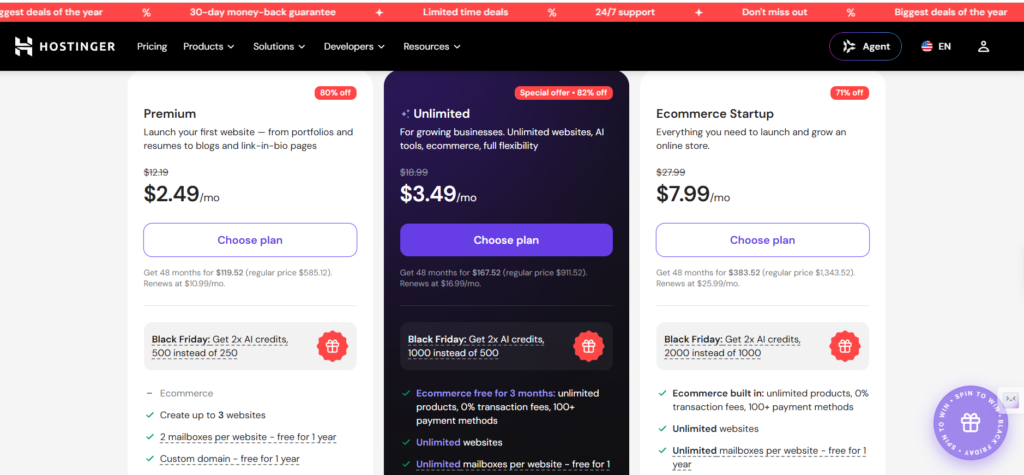
Compare Hostinger Hosting Plans
| Feature | Premium | Unlimited | Cloud Startup |
|---|---|---|---|
| Promotional price/month | $2.49 | $3.49 | $7.99 |
| Regular monthly price shown | $12.19 | $18.99 | $27.99 |
| Total for 48 months | $119.52 | $167.52 | $383.52 |
| Renewal price/month | $10.99 | $16.99 | $25.99 |
| Discount advertised | 80% off | 82% off | 71% off |
| Number of websites | Up to 3 | Unlimited | Unlimited |
| AI credits during promotion | 500 | 1,000 | 2,000 |
| Email mailboxes | 2 per website, free for 1 year | Unlimited per website, free for 1 year | Unlimited per website, free for 1 year |
| Free custom domain | 1 year | 1 year | 1 year |
| Website templates | 400+ | 400+ | 400+ |
| AI store assistant | Included | Included | Included |
| Ecommerce | Not specified in supplied details | Available | Available |
| Email marketing with Reach | Not specified | Included | Included |
| Priority 24/7 expert support | Not specified | Included | Included |
| Money-back guarantee | 30 days | 30 days | 30 days |
| Cancellation | Anytime, subject to terms | Anytime, subject to terms | Anytime, subject to terms |
What should you verify before buying?
Check the current plan description, included features, storage limits, renewal charges, and refund terms. Confirm that the product offers the functionality you need.
Do not choose a plan based on the word “AI” alone. Understand exactly which tasks the service performs and which tasks remain your responsibility.
Which plan is right for you?
If Hostinger AI website builder fits your requirements, you can explore its available plans. However you need to be clear about the following aspects :-
Premium
- Create up to 3 websites for blogs, portfolios, or personal projects.
- Get 500 AI credits under the advertised promotional offer.
- Receive a free domain and two email mailboxes per website for one year.
Unlimited
- Create unlimited websites for growing online businesses.
- Get 1,000 promotional AI credits and unlimited mailboxes per website for one year.
- Access ecommerce tools, email marketing, and priority 24/7 expert support.
Cloud Startup
- Host unlimited websites with a plan designed for performance and scalability.
- Get 2,000 promotional AI credits and unlimited mailboxes per website for one year.
- Access ecommerce features, email marketing, and priority 24/7 expert support.
Compare the available alternatives before making a decision. The right service is the one that meets your needs at a sustainable cost.
Related Posts
Claude’s Invisible AI Fingerprint: What It Really Means
AI Voice Dictation Software: Write Faster Across Every App Today
AI Tools Comparison Guide: Pick Smarter, Work Faster Now
11 Simple Ways to Use AI (Even If You Hate Technology)
FAQs
1. What is AI hosting, and how is it different from regular web hosting?
AI hosting can refer to infrastructure designed to run AI applications, while regular web hosting provides resources for websites. Some hosting packages also include AI-powered website-building tools. The correct choice depends on whether you want to create a conventional website or deploy an application requiring specialised AI capabilities.
2. Can I build a website using AI without coding?
Yes. Many AI website builders can generate an initial design from a description of your project. You can then edit the content and customise the appearance through a visual interface. More advanced functionality may require plugins, integrations, or programming, depending on your chosen platform and requirements.
3. Is AI website hosting suitable for beginners?
It can be suitable if the service includes a straightforward website builder and adequate guidance. Beginners should compare the learning requirements, support options, and overall costs before committing. A simple blog or business website usually does not need the specialised computing resources required by certain AI applications.
4. Can I use WordPress with AI hosting tools?
Yes. You can use AI assistants to plan content and draft articles for a WordPress website hosted on a compatible plan. Some services provide additional AI features, while others simply provide the hosting infrastructure. Check compatibility before installing plugins or connecting external services.
5. Will AI-generated websites rank on Google?
AI-generated websites can appear in Google Search, but their visibility is not guaranteed. Search performance depends on several factors, including content usefulness, relevance, technical accessibility, and competition. Review AI-generated material carefully and add original information that genuinely helps your intended audience.
6. How much does AI hosting cost?
The cost depends on the provider, subscription duration, and features included. A basic website plan may be sufficient for a small blog, whereas an AI application could require additional computing resources or paid API usage. Compare renewal rates and additional charges before selecting a plan.
Conclusion
AI hosting can simplify the journey from a website idea to an online presence, provided you choose the right service.
For blogs or small businesses, an integrated website builder offers convenience.
If flexibility matters, consider WordPress with suitable hosting. Developers should assess their AI application’s specific infrastructure needs.
Define your objective, use AI to accelerate website creation, and review the results carefully. Compare costs before committing.
Affiliate disclosure: This article contains affiliate links. I may receive a commission if you purchase through them, at no additional cost to you.