
Faster AI Text Generators: How To Write Better Text With AI
Faster AI Text Generators can turn a blank page into a workable first draft in seconds.
That matters when you are staring at an unfinished blog post, email, report, social media caption, or business document and simply cannot find the right words.
According to Market Research Future, the AI Text Generator Market was valued at USD 0.5792 billion in 2024 and is projected to reach USD 3.645 billion by 2035, growing at a CAGR of 18.2%.
The question is no longer whether AI can write.
It is how you can use it without producing bland, inaccurate text.
This article shows you how.
What Are AI Text Generators?
An AI text generator is a software tool that uses artificial intelligence to create, rewrite, summarize, expand, or improve written content from instructions you provide.
You give the tool a prompt.
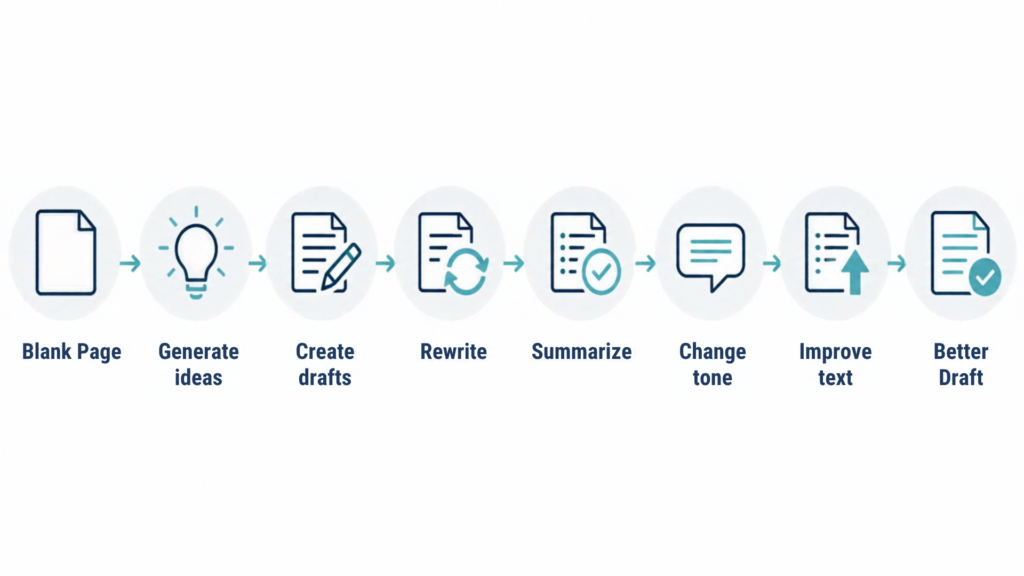
It analyzes your instructions and generates text based on patterns learned from large amounts of training data.
That sounds complicated, but using one does not have to be.
Think of an AI text generator as a writing assistant that can help you move from blank page to workable draft much faster.
It can help you:
- Generate ideas when you are stuck.
- Create a first draft.
- Rewrite awkward sentences.
- Summarize long information.
- Change the tone of existing text.
- Create headlines and introductions.
- Turn notes into a structured document.
- Improve clarity and readability.
The important point is that AI-generated text is not automatically finished text.
You still need to decide what should be written, what information matters, and whether the final version is accurate.
How Do AI Text Generators Work?
Most modern AI writing tools are powered by large language models.
These models process your instructions and predict suitable sequences of words based on patterns learned during training.
You do not need to understand the mathematics behind this process to use the technology effectively.
What matters is understanding one simple principle:
Better instructions generally produce more useful output.
If you type:
Write a blog post about exercise.
you have given the AI very little information.
But if you say:
Write a 1,000-word beginner-friendly article about walking for weight management. Use a conversational tone, short paragraphs, practical examples, and five clear subheadings.
the task becomes much clearer.
That difference is at the heart of effective AI writing.
What Can AI Text Generators Write?
The usefulness of AI writing becomes clearer when you look at everyday tasks.
You do not need to use AI to write an entire article from beginning to end.
Sometimes one paragraph is all you need.
Blog Posts And Articles
AI can help you brainstorm topics, create outlines, draft sections, rewrite introductions, develop FAQs, and improve existing content.
For bloggers, this can reduce the friction involved in getting started.
The key is to bring your own expertise into the process.
A generic AI-generated article may contain correct-sounding information while saying very little that is distinctive.
Your experience is what gives the article personality and usefulness.
Emails And Professional Communication
AI can also help with routine communication.
For example, you can ask it to turn rough notes into:
- A professional email.
- A customer response.
- A meeting summary.
- A proposal.
- A follow-up message.
- A presentation outline.
- A workplace announcement.
This is where AI can save considerable time because the problem is often not knowing what to say.
It is knowing how to say it clearly.
Social Media Content
An AI text writer can turn one longer piece of content into several shorter formats.
You could provide a blog paragraph and ask for:
- Three LinkedIn posts.
- Five social media captions.
- Ten headline ideas.
- A short email introduction.
- A concise summary.
One piece of thinking can therefore produce several pieces of communication.
Rewriting And Editing
This is one of the most useful applications of AI writing tools.
Instead of asking AI to create something from nothing, give it something you have already written.
Then ask it to make the text:
- Clearer.
- Shorter.
- More conversational.
- More professional.
- Easier for beginners to understand.
- More persuasive without becoming aggressive.
That gives you greater control over the final result.
How To Write Text With AI

Image: Forbes
If you want Faster AI Text Generators to genuinely improve your writing process, do not begin by asking AI to “write everything.”
Start with a simple five-step process.
Step 1: Define The Task
First tell the AI exactly what you want it to produce.
Instead of:
Write about blogging.
Try:
Write an introduction for a beginner’s guide to blogging. Explain why beginners struggle to create consistent content and show how a simple publishing system can help.
The second prompt gives the AI a job.
That matters.
Step 2: Provide Context
AI does not automatically know your situation.
Give it the information it needs.
For example:
I run a beginner-friendly technology blog. My readers are non-technical professionals who want practical explanations rather than technical jargon.
Now the AI has useful context.
The same principle applies to emails, reports, social posts, product descriptions, and almost anything else.
Step 3: Identify Your Audience
Tell the AI who will read the content.
You might say:
Write for a 45-year-old professional who understands basic technology but is not comfortable with technical terminology.
That instruction can change vocabulary, examples, sentence length, and tone.
Step 4: Specify Tone And Format
Tell the AI how you want the writing to sound.
For example:
Use a conversational but credible tone. Keep paragraphs short. Avoid hype. Explain technical terms in plain English.
You can also specify the format.
For example:
Use one H1, six H2 sections, short paragraphs, one comparison table, and bullet points where useful.
Step 5: Review And Improve
This is the step many beginners skip.
Do not immediately publish the first output.
Read it.
Check it.
Question it.
Then ask the AI to improve specific weaknesses.
This creates a much better relationship between human judgment and AI assistance.
A Simple AI Writing Workflow
A practical workflow does not need to be complicated.
Use this sequence:
Idea → Context → Prompt → Draft → Review → Fact-check → Edit → Publish
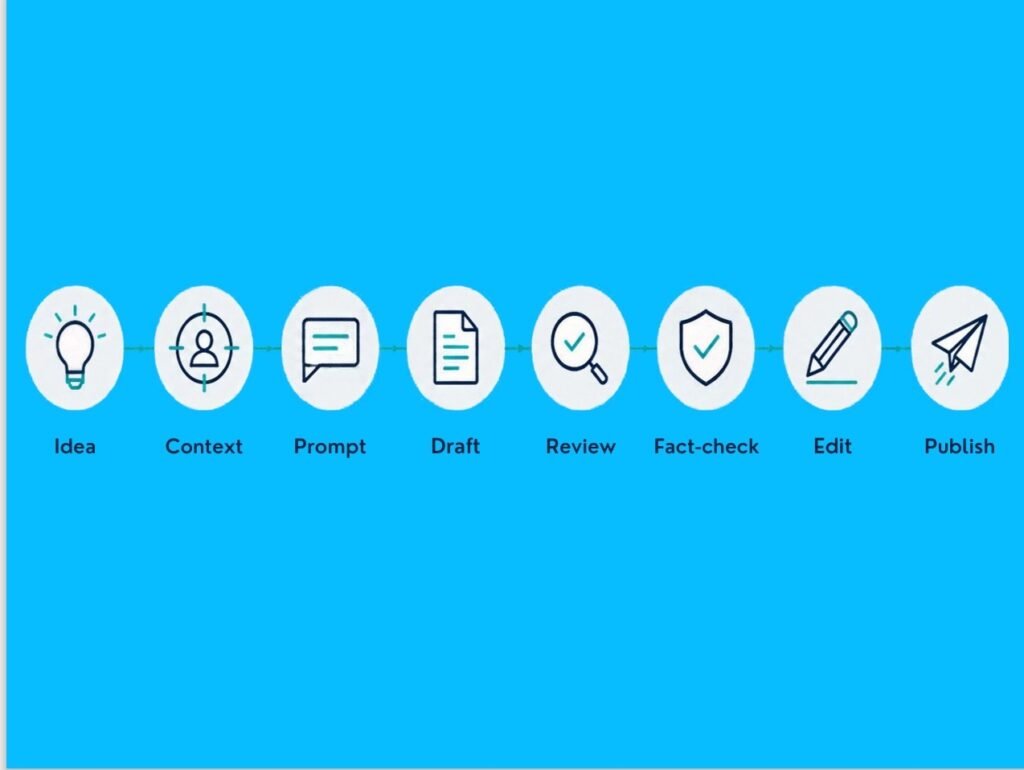
Here is what each stage means:
| Stage | Your job | AI’s possible role |
|---|---|---|
| Idea | Decide what you want to communicate | Generate ideas |
| Context | Provide background | Organize information |
| Prompt | Give clear instructions | Interpret the task |
| Draft | Create initial content | Produce a starting point |
| Review | Judge quality and relevance | Identify weaknesses |
| Fact-check | Verify important claims | Help identify claims needing verification |
| Edit | Add your voice and experience | Improve clarity |
| Publish | Make the final decision | Assist with final checks |
This is where Faster AI Text Generators become genuinely useful.
The objective is not to remove yourself from the writing process.
It is to remove unnecessary friction from it.
How To Write Better AI Prompts
A good prompt does not need to be complicated.
A useful structure is:
Task + Context + Audience + Format + Tone + Constraints
For example:
Write a 700-word article explaining how beginners can use AI for email writing. The audience is non-technical professionals. Use a conversational tone, short paragraphs, practical examples, and five H2 headings. Avoid exaggerated claims and technical jargon.
Compare that with:
Write an article about AI email writing.
The second prompt leaves almost everything to interpretation.
The first gives the AI a framework.
Give The AI Examples
Examples can be particularly useful when you have a specific writing style.
You can provide a paragraph and say:
Study the writing style of this paragraph. Rewrite the following section using a similar sentence rhythm, vocabulary, and level of formality. Do not copy the wording.
This can produce more consistent results than simply asking for a “professional tone.”
Ask For Alternatives
Do not settle immediately for the first sentence or headline.
Ask:
Give me five alternative introductions. Keep the meaning the same but make each one distinct.
Then choose the strongest starting point.
You remain the editor.
Ask Follow-Up Questions
AI writing does not have to be a one-shot process.
You can say:
This sounds too generic. Make it more specific.
Or:
Explain this as if you were teaching someone who has never used an AI writing tool.
Or:
Give me three practical examples.
That conversational refinement is often where the biggest improvement occurs.
AI Text Generator Prompts You Can Actually Use
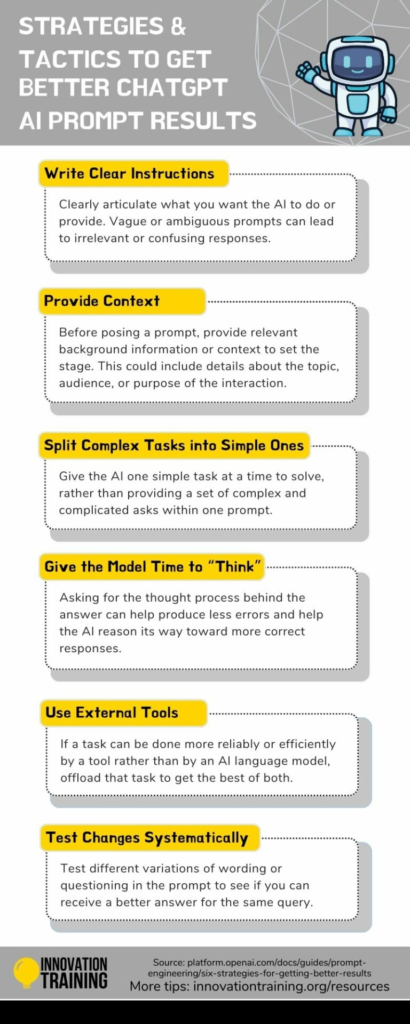
Image: InnovationTraining.org
Here are practical prompts you can adapt immediately.
Writing A Blog Post (Prompt )
Act as an experienced content writer. Create a detailed outline for an article about [topic]. The audience is [audience]. Cover the main questions beginners are likely to have. Suggest practical examples and FAQs. Avoid generic filler.
Improving Existing Writing (Prompt )
Rewrite the following passage for clarity and readability. Keep the original meaning and important facts. Remove repetition, simplify awkward sentences, and make the writing sound natural rather than AI-generated.
Writing An Email (Prompt )
Turn these rough notes into a professional but friendly email. Keep it concise. Do not sound overly formal or apologetic. Make the requested action clear.
Summarizing Information (Prompt )
Summarize the following information in five key points. Preserve important facts and numbers. Remove repetition. Write for someone who needs to understand the subject quickly.
Changing Tone (Prompt )
Rewrite this paragraph in a calm, confident, conversational tone. Keep the meaning unchanged. Avoid hype, exaggeration, and unnecessary adjectives.
Generating Ideas (Prompt )
Give me 20 practical content ideas around [topic]. Focus on questions people actually face rather than broad generic topics. Group the ideas into beginner, intermediate, and advanced themes.
Improving A Draft (Prompt )
Review this draft as an experienced editor. Identify unclear sections, repetition, unsupported claims, weak transitions, and places where the writing sounds generic. Then suggest specific improvements.
Notice what these prompts have in common.
They do not simply say, “Write something.”
They explain the job.
How To Get Better Results From AI Text Generators
Even good prompts can produce mediocre writing.
The solution is usually not a longer prompt.
It is better interaction.
Give The AI More Useful Information
If the AI produces generic writing, ask yourself whether you gave it enough context.
Tell it:
- Who the reader is.
- What the reader already knows.
- What problem the reader has.
- What outcome you want.
- What tone you prefer.
- What examples should be included.
- What should be avoided.
More relevant context gives the AI more to work with.
Ask For Specific Improvements
Instead of regenerating an entire article, identify the problem.
For example:
The introduction is too generic. Rewrite it around the reader’s frustration with spending two hours on a task that should take twenty minutes.
Specific criticism usually produces more useful revisions.
Add Your Own Experience
This is particularly important for bloggers.
AI has access to enormous amounts of information.
It does not have your personal experience.
If you have tested a tool, made a mistake, learned something the hard way, or developed your own process, include that material.
That is where your content becomes more distinctive.
Use AI As A Thinking Partner
AI can also help before you start writing.
Ask:
What questions would a beginner have about this topic?
Then:
Which of these questions should be answered first?
Then:
What misconception should I address?
You are using AI to improve your thinking, not simply to produce words.
How To Check And Edit AI-Generated Text
No AI text generator should be treated as an automatic publishing machine.
AI can produce confident-sounding statements that are incomplete, outdated, or incorrect.
That is why verification matters.
A Reuters report in 2024 also highlighted concerns about accuracy as organizations expanded their use of generative AI.
Before publishing, check the following:
Check Facts And Numbers
Verify statistics, dates, names, prices, scientific claims, quotations, and references.
Never assume that a confident sentence is a correct sentence.
Remove Generic Statements
AI often produces phrases that sound polished but add little information.
For example:
In today’s rapidly changing digital landscape…
Ask yourself whether the sentence actually tells the reader anything.
If it does not, delete it.
Add Your Own Voice
Replace generic examples with real ones.
Add your own observations.
Explain what you learned.
Give the reader something they cannot get from hundreds of similar AI-generated pages.
Check The Flow
Read the article from beginning to end.
Does one section naturally lead to the next?
Are the same ideas repeated?
Does the conclusion actually answer the problem introduced at the beginning?
Human editing still matters.
AI Text Generators And Human Writing
The most useful way to think about AI is not “AI versus human.”
It is AI plus human judgment.
AI is good at generating possibilities quickly.
Humans are better positioned to decide what matters.
| AI can help with | You should control |
|---|---|
| Ideas | Purpose |
| First drafts | Accuracy |
| Rewriting | Final judgment |
| Summaries | Personal experience |
| Structure | Facts |
| Alternatives | Ethics |
| Formatting | Publishing decision |
This division of responsibility makes the writing process more efficient without making it impersonal.
The faster the tool becomes, the more important your editorial judgment becomes.
Popular AI Text Generators And Writing Tools
There is no single tool that is ideal for every writing task.
General-purpose AI assistants can handle many different writing jobs, while specialized AI writing platforms may provide templates and workflows for particular types of content.
For example, tools such as ChatGPT, Jasper, Writesonic, and Copy.ai approach AI-assisted writing in somewhat different ways.
| Type of tool | Useful for | What to consider |
|---|---|---|
| General AI assistant | Research, drafting, rewriting, brainstorming | Requires good prompting |
| Marketing writing platform | Marketing copy and campaigns | Often includes specialized workflows |
| SEO-focused writing tool | Search-oriented content | Check how well its recommendations fit your actual topic |
| Editing-focused tool | Grammar, clarity and refinement | It may not replace a full writing assistant |
Do not choose a tool simply because someone calls it the “best AI writer.”
Start with your actual writing task.
How To Choose An AI Text Generator
Image: Russel Research
Choosing a writing tool becomes easier when you answer a few practical questions.
What Do You Write Most Often?
If you mainly write emails, you may need something different from someone producing long-form articles every week.
Do You Need General Or Specialized Help?
A general AI assistant may be enough for occasional writing.
A specialized platform may make sense when you repeatedly perform the same marketing or content tasks.
Do You Need Editing Features?
Some tools focus heavily on generating content.
Others place more emphasis on editing, optimization, brand consistency, or workflow management.
What Is Your Budget?
Start with the task, not the subscription.
If a free or lower-cost tool handles your requirements, there may be little reason to pay for features you will not use.
Will It Fit Your Workflow?
The best tool for you is the one that fits naturally into how you already work.
That might mean drafting in an AI assistant, editing in another application, checking facts separately, and then publishing through your normal platform.
What AI Text Generators Cannot Do Reliably
AI writing has impressive capabilities, but it also has clear limitations.
AI Can Produce Incorrect Information
An AI model can generate an answer that sounds authoritative even when the information is wrong.
This is why important claims need verification.
AI Can Sound Generic
Ask AI to write about almost any broad subject and it can produce a reasonable article.
The problem is that “reasonable” is not the same as “valuable.”
Thousands of websites can publish reasonable information.
Your job is to make yours more specific.
AI Does Not Know Your Intent Automatically
You may know exactly what you mean.
The AI does not.
If your instructions are vague, the output may reflect that vagueness.
AI Should Not Replace Judgment
AI can suggest.
It can help in drafting.
AI can reorganize.
But you decide what should finally be said.
That distinction is especially important when writing about health, finance, law, technology, research, or other subjects where inaccurate information can cause real problems.
Using AI Text Generators Responsibly
Speed should not become an excuse for careless publishing.
Use AI responsibly by following a few basic principles:
- Verify important factual claims.
- Do not present invented information as fact.
- Do not fabricate quotations or sources.
- Avoid copying another person’s distinctive work.
- Review sensitive or consequential content carefully.
- Protect confidential information when using external AI services.
- Disclose AI involvement when a publication or organization requires it.
- Add genuine human judgment and original value.
The goal is not simply to generate more text.
It is to create useful text more efficiently.
Frequently Asked Questions
What Are AI Text Generators Used For?
AI text generators can help create, rewrite, summarize, expand, organize, and edit written content. Common uses include blog posts, emails, social media posts, reports, product descriptions, outlines, and brainstorming.
Can AI Text Generators Write Blog Posts?
Yes. They can help with topic ideas, outlines, drafts, introductions, individual sections, FAQs, and editing. However, a good blog post still requires human review, fact-checking, experience, and editorial judgment.
How Accurate Is AI-Generated Text?
Accuracy varies according to the subject, model, prompt, and information involved. AI can produce incorrect or outdated information while sounding confident, so important claims should be independently verified.
Can Beginners Use AI Text Generators?
Absolutely. Beginners can start with simple tasks such as rewriting paragraphs, generating ideas, summarizing information, and drafting emails. The most important skill is learning how to give clear instructions.
How Do I Write Better AI Prompts?
Include the task, context, audience, desired format, tone, and important constraints. If the first answer is weak, explain what needs improvement and ask for a revision rather than starting again from scratch.
Are AI Text Generators Replacing Human Writers?
AI is changing how many writing tasks are performed, but writing still involves judgment, experience, creativity, fact-checking, audience understanding, and responsibility. In many workflows, AI is being used as an assistant rather than as a complete replacement for human decision-making.
Related Resources
Maximizing Value: Smart ROI Strategies for AI Text Generators
Why Multilingual AI Text Generators Are Game-Changers
11 Key Uses of AI Text Generators Revolutionizing Content
How Customized AI Text Generators Transform Writing
The Ultimate AI Text Generators for Content Writers
Conclusion
Faster AI Text Generators can help you move from a blank page to a useful first draft much more quickly, but speed alone does not create good writing.
The real advantage comes from combining AI’s ability to generate and restructure text with your own judgment, experience, facts, and voice.
Start with a clear task, provide useful context, write better prompts, review every important claim, and refine the output instead of accepting the first answer.
Used this way, AI becomes less of an automatic writer and more of a practical writing partner.
The goal is simple: use Faster AI Text Generators to spend less time fighting the blank page and more time creating something worth reading.