
10 Useful AI Tools You Should Know About
Useful AI tools are changing the way we work, create, research, communicate, and solve everyday problems.
But with thousands of AI products appearing every month, it can be difficult to know which ones are genuinely worth exploring.
In this article, we look at ten interesting AI tools covering areas such as design, video creation, email management, business decisions, AI visibility, investing, workplace knowledge, and 3D animation.
Some are extremely simple, while others are designed for specialized users.
The aim is to introduce you to practical tools that could potentially save time, improve productivity, or spark new ideas.
Useful AI Tools for Everybody
| # | AI Tool | Description |
|---|---|---|
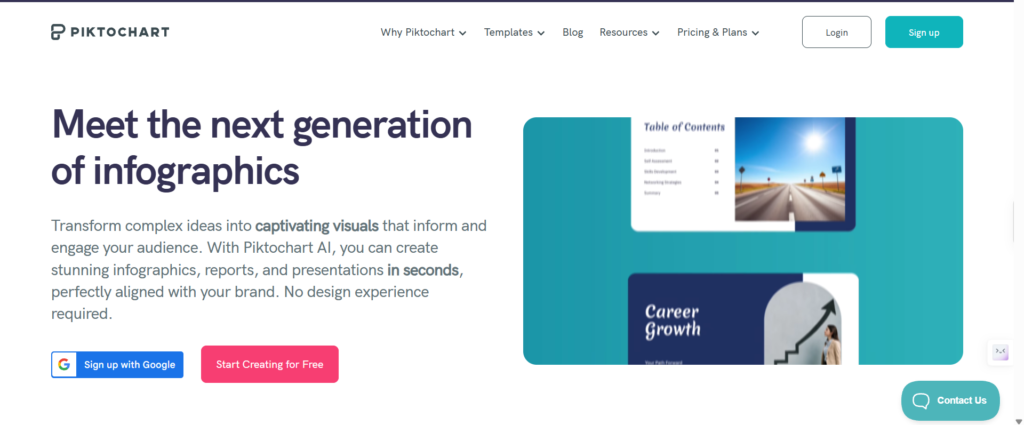
| 1 | Piktochart | Piktochart turns prompts, notes, or documents into editable infographics, presentations, reports, charts, and visuals without requiring design skills. |
| 2 | Kvorum | Kvorum gives you five AI advisers who challenge your thinking, debate assumptions, offer different perspectives, and provide recommendations on growth, finance, branding, operations, and customer experience. |
| 3 | IdeaVideo | IdeaVideo AI transforms prompts, images, and footage into videos using multiple AI models for text-to-video, image-to-video, and video transformation. |
| 4 | Glean | Glean connects company knowledge, applications, and workflows, helping employees search information, answer questions, understand context, and automate tasks through AI agents across different business functions. |
| 5 | Are You Found By AI | Are You Found By AI monitors your website’s visibility across AI search systems, helping marketers understand how discoverable their content is. |
| 6 | Cluing | Cluing lets AI agents continue working after you close your laptop. It connects research, documents, information, and integrations, allowing agents to perform tasks, collaborate, and publish websites or applications while working in the background without requiring constant user supervision. |
| 7 | Rate My Body | Rate My Body analyzes physique photos, providing aesthetic scores, identifying strengths, proportions, and improvement areas while offering visual feedback. |
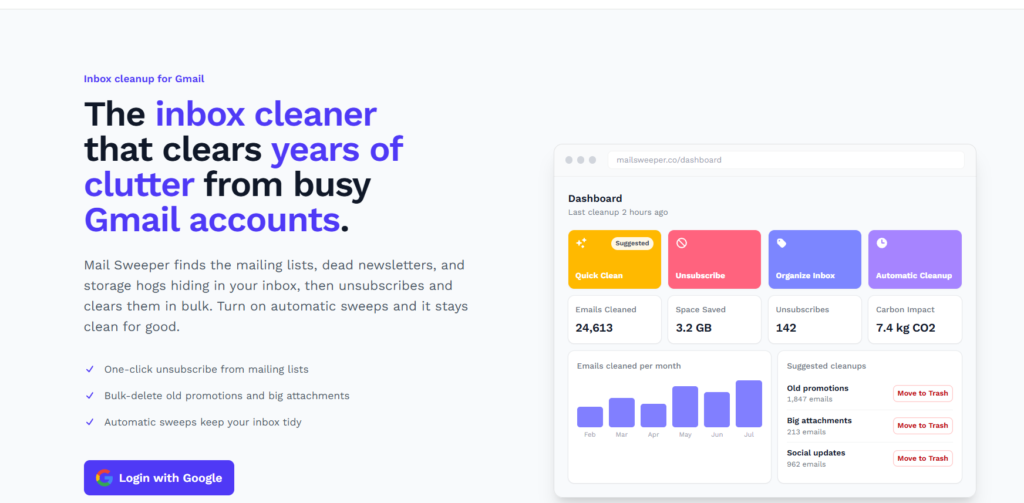
| 8 | MailSweeper | MailSweeper cleans Gmail by finding unwanted newsletters, unsubscribing in bulk, reducing clutter, and helping reclaim valuable email storage. |
| 9 | GoAI | GoAI helps monitor stocks, provides potential trade ideas and price targets, and alerts investors about breakouts, earnings, and important market events. |
| 10 | PINOC | PINOC creates rigged 3D characters from images and transfers movement from phone videos into Blender, helping creators and animators produce 3D animations faster. |
1. Piktochart
Q1. What is Piktochart?
Piktochart is one of the useful AI tools that helps you create attractive visual content without needing design skills.
You can give it a simple prompt, some notes, or upload a document, and it can turn that information into an infographic, presentation, report, or other visual. You can then edit the result to suit your needs.
Q2. Do I need design experience to use Piktochart?
No. Piktochart is specifically useful for beginners who don’t know professional design software.
You can start with a simple description of what you want, and AI creates an initial design for you.
You can then change the text, images, colors, icons, and layout using relatively simple editing controls rather than designing everything from scratch.
Q3. Who would find Piktochart useful?
Piktochart can be useful for bloggers, teachers, students, marketers, business owners, social-media creators, and professionals who need attractive visuals quickly.
For example, instead of spending hours designing an infographic manually, you could provide your article or notes and ask Piktochart to turn the information into an easy-to-understand visual that you can subsequently edit and share.
2. Kvorum
Q1. What is Kvorum?
Kvorum is like having a virtual team of AI advisers available to discuss an important decision with you.
Instead of asking one AI for an answer, you can have several AI advisers look at your situation from different viewpoints.
They can question your assumptions, disagree with one another, and help you think through complicated business decisions.
Q2. Why would I need five AI advisers?
Sometimes one person’s—or one AI’s—answer can be limited by a particular viewpoint.
Kvorum attempts to overcome this by having several AI advisers examine the same problem differently.
One might focus on money, another on customers, another on growth, and another on risks. Their different perspectives can help you notice things you hadn’t considered.
Q3. Is Kvorum useful for someone who isn’t a business expert?
Yes. Kvorum is one of the useful AI tools for which you don’t need to understand complicated business terminology to benefit from.
You can simply explain your situation in ordinary language, such as “I want to start an online coaching business but I’m unsure about pricing.”
The AI advisers can then question your plan, explain their reasoning, and help you explore possible options before making a decision.
3. IdeaVideo

Q1. What does IdeaVideo actually do?
IdeaVideo helps turn ideas, written descriptions, pictures, or existing video material into videos using AI.
Instead of learning complicated video-editing software, you can describe what you want and let AI create or transform visual content. It can also generate movement between a starting image and an ending image, helping create smoother video sequences.
Q2. Do I need to know video editing?
No. IdeaVideo is, in fact, one of the useful AI tools designed to reduce the technical work normally involved in creating videos.
A beginner can start with an idea, photograph, or written description and let AI handle much of the creation process.
You may still want to make adjustments afterward, but you don’t need professional filmmaking or animation knowledge to get started.
Q3. What could I use IdeaVideo for?
There are many possibilities.
You could create short videos for YouTube, Instagram, advertising, presentations, websites, or educational content.
For example, a blogger could turn an article idea into a visual video, while a business owner could create a promotional clip.
It can be particularly useful when you want professional-looking video content without hiring a full production team.
4. Glean
Q1. What is Glean in simple terms?
Glean is an AI assistant designed primarily for businesses.
Imagine having one search box that can look through information scattered across your company’s different systems and applications.
Instead of manually searching through documents, emails, and workplace information, employees can ask questions in normal language and receive answers based on the information available within their organization.
Q2. How is Glean different from Google?
Google mainly searches information available on the public internet.
Glean is one of the useful AI tools designed to search information inside an organization, such as company documents, workplace applications, and internal knowledge.
Think of Google as searching the world outside your company, while Glean is more like having an intelligent search assistant that helps you find information inside your workplace.
Q3. Would an ordinary individual need Glean?
Probably not. Glean is mainly designed for organizations with large amounts of internal information spread across many systems.
A small individual business may not need such a sophisticated platform.
However, if a company has thousands of documents, employees, procedures, and internal resources, Glean can potentially make finding and using that information considerably easier.
5. Are You Found By AI
Q1. What does “found by AI” mean?
When people ask ChatGPT, Claude, Gemini, or other AI systems questions, those systems may recommend websites, companies, or sources in their answers. “AI visibility” refers to how often your website or brand appears in those AI-generated answers. Are You Found By AI is designed to help businesses understand and monitor how visible they are within this emerging type of search.
Q2. Why should a website owner care about AI visibility?
People increasingly use AI assistants instead of traditional search engines to find information, products, services, and recommendations.
If an AI system never mentions your website or business, you could potentially lose opportunities to reach those users.
Monitoring AI visibility helps you understand whether AI systems recognize your brand and the topics or services associated with it.
Q3. Is this useful for bloggers?
Yes, particularly if you’re trying to build a website, personal brand, or online business. Traditional SEO focuses heavily on appearing in Google search results.
AI visibility is becoming another consideration because people can now ask AI assistants questions directly.
Monitoring how AI systems describe or mention your content can give you additional information about your online presence.
6. Cluing

Q1. What is Cluing?
Cluing is designed to let AI agents continue working on tasks even when you’re no longer sitting in front of your computer. An AI agent is essentially software that can perform a series of tasks for you. Instead of asking AI one question and waiting for an answer, you can give it a larger task and allow it to work through the process.
Q2. What is an AI agent?
Think of an AI agent as a digital worker rather than simply a chatbot.
A chatbot generally answers your questions when you ask them.
An agent can potentially take several steps to accomplish a task—for example, researching information, organizing it, connecting different services, and completing a workflow.
Cluing is designed around this more automated approach.
Q3. Why would I want AI to work while I’m away?
Some tasks take longer than a few minutes and don’t require your constant attention.
For example, you might ask an AI system to research a subject, organize information, or work through a multi-step project.
Instead of keeping your computer open and monitoring it continuously, a service like Cluing allows the work to continue in the background.
7. Rate My Body
Q1. What is Rate My Body?
Rate My Body is an AI-based visual assessment tool that analyzes a photograph of your body and provides feedback about appearance, style, grooming, posture, and physical features.
It can identify what it considers your strongest features and suggest areas that might be improved.
It should be viewed as an appearance-feedback tool, not as a medical or fitness diagnosis.
Q2. Do I need professional photographs?
No. The basic idea is that you provide a full-body photograph, and the AI analyzes what it can see.
A clearer, reasonably well-lit photograph will generally give an AI system more useful visual information. You don’t necessarily need professional photography equipment.
However, remember that AI-based assessments are subjective and should not be treated as absolute judgments about your appearance.
Q3. Can it tell me whether I’m healthy?
No—not reliably. An AI analyzing a photograph cannot provide a proper medical assessment of your health.
It may comment on visible appearance, posture, or proportions, but that is very different from evaluating your health or diagnosing a condition.
For genuine health or fitness concerns, information from qualified medical or fitness professionals is more appropriate.
8. MailSweeper
Q1. What problem does MailSweeper solve?
MailSweeper is one of the useful AI tools designed to help clean up an overcrowded Gmail inbox.
Many people accumulate hundreds or thousands of newsletters, promotional emails, and old messages over time.
Instead of manually opening and deleting them one by one, MailSweeper can identify unwanted email, help unsubscribe from newsletters, and organize potential clutter so you can review it more efficiently.
Q2. Can MailSweeper delete my important emails?
You should always be careful before allowing any automated tool to delete email.
MailSweeper’s approach includes putting questionable clutter into a temporary review area, allowing you to inspect it before taking further action.
Even so, beginners should review what the service is doing and understand its permissions before connecting it to their Gmail account.
Q3. Why would I use it instead of Gmail’s normal search?
Gmail already provides powerful search and filtering features, but cleaning years of accumulated subscriptions can still be tedious.
MailSweeper is designed specifically around this cleanup problem.
Instead of figuring out individual searches and filters yourself, you can use its automation to identify newsletters and other clutter and process many unwanted emails more efficiently.
9. GoAI
Q1. What is GoAI?
GoAI is one of the useful AI tools aimed at helping people monitor and research stocks. It can provide potential buying or selling ideas, price targets, and alerts relating to events such as earnings announcements or price breakouts. In simple terms, it acts like a market-monitoring assistant that watches information for you instead of requiring you to track everything manually.
Q2. Can GoAI tell me exactly which stocks will make money?
No. No AI tool can reliably predict which stocks will definitely make money. Stock prices depend on many unpredictable factors.
GoAI’s suggestions should therefore be treated as information for further research, not as guaranteed investment advice.
Before investing, you should independently check the company’s fundamentals, valuation, risks, and your own financial circumstances.
Q3. What is a watchlist?
A watchlist is simply a collection of stocks you want to keep an eye on.
For example, you might be interested in ten companies but don’t want to constantly monitor their prices yourself.
A tool like GoAI can watch those companies and alert you when something important happens, such as a major price movement or earnings announcement.
10. PINOC
Q1. What does PINOC do?
PINOC is an AI-assisted 3D animation tool. One of its interesting capabilities is creating a rigged 3D character from a single image.
“Rigged” means the digital character has an internal structure that allows its arms, legs, body, and other parts to move. It can then use movement captured from ordinary phone video to animate that character.
Q2. What does “motion capture” mean?
Motion capture simply means recording someone’s movement and transferring that movement to a digital character.
For example, you could record yourself walking or dancing with a phone.
The software analyzes your movements and uses that information to make a 3D character perform similar movements. This can save animators considerable time compared with creating every movement manually.
Q3. Do I need to be a professional animator to use PINOC?
Not necessarily. PINOC is one of the useful AI tools intended to simplify parts of the traditional 3D-animation process. A beginner may still need to learn some basic concepts, particularly if they want to work extensively inside Blender. However, generating a character and transferring movement automatically can remove some of the most technically demanding steps involved in traditional character animation.
Related Posts
Claude’s Invisible AI Fingerprint: What It Really Means
The Truth About AI and Human Emotions Nobody Discusses
Smart AI Learning Habits for Non-Techies Taking Free Courses
AI Voice Dictation Software: Write Faster Across Every App Today
Conclusion
Useful AI tools don’t necessarily have to be complicated or revolutionary to make a difference.
Sometimes, the best tool is simply one that saves you an hour of repetitive work, helps you create something faster, or gives you a perspective you hadn’t considered.
The ten tools covered here demonstrate how widely AI is expanding—from graphics and videos to email cleanup, business decisions, workplace knowledge, investing, and animation. You don’t need to try everything.
Pick one tool relevant to your current needs, experiment with it, and discover whether AI can make your everyday work simpler, faster, or more creative.